Chithram AI — describe it, it draws itself
Chithram AI turns a sentence into a hand-drawn picture. You describe what you want; a language model replies with a strict declarative drawing spec (pure JSON, never code); and Chithram's server renders it through the Chitram SDK — a 100% JavaScript drawing interface producing crisp vector SVG with a hand-made feel. Every stroke is a filled ribbon, every curve is a noisy seeded blob, and nothing is ever raster. No generated code runs in your browser — the browser only ever receives finished SVG.
same seed → identical drawing, crumb-for-crumb. The spec gives every
primitive a short string seed, so drawings are reproducible pixel-for-pixel.
Theme & media explorer
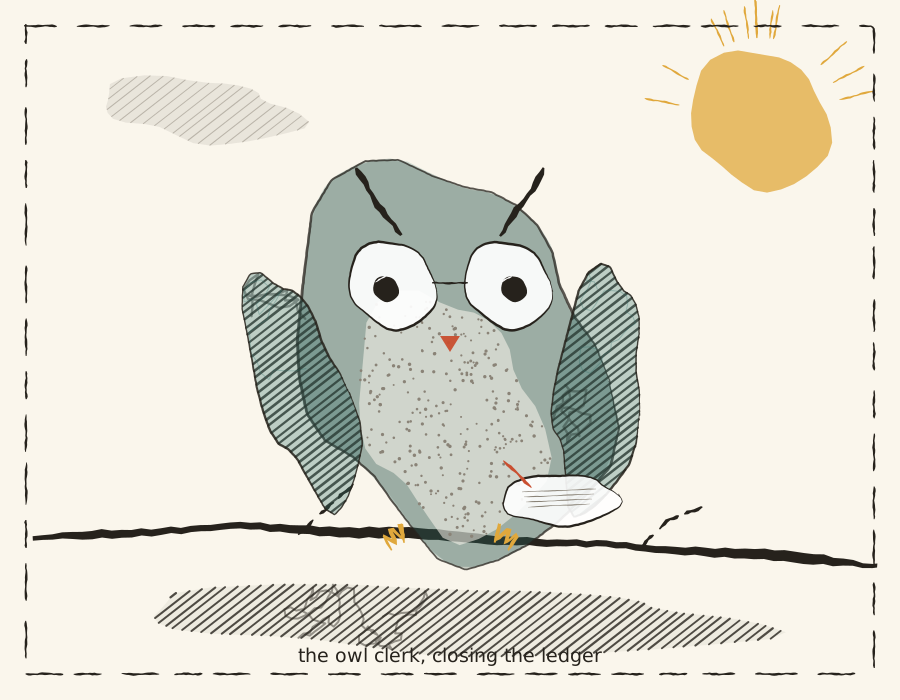
Palettes and media are easier to choose when you can see them. Below is The Owl Clerk — the editorial gallery example — pre-rendered at build time in every palette × media combination. Pick a combination and the owl swaps instantly. All artwork here was produced by the same server-side interpreter that renders your prompts.
Palette
Media
auto keeps the example's own choices (watercolour body, graphite wings and shadow); none strips all media passes for pure line-and-fill; any other option re-renders every media pass with that single medium.
The drawing spec
The model's entire output contract is one JSON document. It names primitives, colors and seeds — the server interpreter does the geometry. Because it is data, not code, it is schema-validated before anything happens, and invalid specs are rejected outright.
{
  "canvas":  { "width": 800, "height": 600, "background": "paper" },
  "palette": "editorial",
  "shapes": [
    { "op": "blob", "cx": 400, "cy": 220, "rx": 120, "ry": 92,
      "wobble": 1.2, "seed": "body", "as": "body" },
    { "op": "fillRegion", "region": "$body", "fill": "accent3", "alpha": 0.8 },
    { "op": "hatch", "region": "$body", "spacing": 8, "color": "shadow", "seed": "shade" },
    { "op": "label", "x": 400, "y": 48, "text": "a creature", "size": 18, "color": "ink" }
  ]
}- ops:
stroke,broken,blob,hatch,stipple,scribble,fillRegion,polygon,arrowHead,media,box,arrow,label,pipeline - colors: hex like
"#c94f30"or palette keyspaper ink accent1 accent2 accent3 skin shadow - regions: register a point ring with
"as":"name", reuse it as"region":"$name"or"pts":{"ref":"name","closed":true} - layers: every shape takes
"layer":-10..10; higher renders on top - media:
{"op":"media","medium":"graphite|ink|watercolour|marker|oil","region":"$body","tone":true,"skin":"accent2","edge":true}
Limits keep things sane: ≤ 2000px canvas, ≤ 120 shapes, ≤ 128 points per shape, text ≤ 120 chars.
Writing effective prompts
You don't need to know the spec format to use Chithram — but knowing how to describe a scene makes the difference between a mess and a picture. The model reads your prompt and chooses primitives, palette and media for you.
Structure your prompt around four things
- The subject — name it plainly: "an owl with round glasses", "a four-stage pipeline", "a person flying a kite".
- Where things are — relative positions or regions: "perched on a branch", "left to right", "in the top-left corner".
- Style & medium — palette (
editorial/blueprint/mono/warm/ink) and media (watercolour/graphite/ink/marker/oil) if you care. - Text — any labels, captions or titles, in quotes.
Do
- Name the subject first, then decorate it: "a round owl perched on a branch".
- Place objects relative to each other: "a pipeline of four boxes left to right".
- Mention palette + medium + a title caption when you want a finished look.
- Ask for follow-up edits — the studio keeps your recent turns so you can say "make it bigger".
Don't
- Ask for photorealism, gradients or blur — Chitram is procedural vector SVG, never raster.
- Ask for code execution — the model can only emit JSON data, and only whitelisted ops pass validation.
- Be ambiguous about counts — "some birds" becomes chaos; say "three birds".
Worked examples — what each phrase controls
A scene
"A small scene of a person flying a kite on a warm hill: filled blob kite with crossed spars and a dashed tail, a simple figure with waving arm holding the string, a filled-and-hatched hill, grass tufts, and the caption 'tuesday, wind from the west'. Use the warm palette."
- "filled blob kite… crossed spars" →
blob+ twostrokes over it - "dashed tail" →
broken - "filled-and-hatched hill" →
blob+fillRegion+hatch - "caption …" →
label; "warm palette" → palette switch
A diagram
"A flow diagram titled 'how a drawing gets made' with a horizontal pipeline of four stages: Brief, Sketch, Ink, Ship (Ink accented, Ship ghosted), a curved feedback arrow from Ship back to Sketch labelled 'notes come back', two side panels, and a hand-drawn underline."
- "pipeline of four stages" →
pipeline - "accented / ghosted" →
kinds:["plain","plain","accent","ghost"] - "curved feedback arrow … labelled" →
arrowwithbow+label
Iteration tips
- Reuse seeds deliberately. Follow-ups regenerate the whole spec; stable seed names keep the parts you liked stable.
- Captions are one primitive away. Ask for "a caption reading …".
- Flows want pipelines. Say "flow diagram"/"left to right" and the model reaches for
box/arrow/pipeline.
Shipped presets
Three presets ship with the app — real example programs from the SDK, pre-rendered at build time through the server interpreter. In the studio, click an example card to load its prompt and its artwork; iterate on it with Generate, or Save/Share it directly.
The Owl Clerk
preset: editorial
An editorial illustration of "the owl clerk": a round owl with round glasses perched on a branch, closing a ledger with a pen. Warm late sun, hatched clouds, stippled belly, graphite ground shadow, hand-drawn frame and caption.
This is also the example behind the theme explorer above.
Flow diagram — boxes & arrows
preset: diagram
A flow diagram titled "how a drawing gets made" with a horizontal pipeline of four stages, a curved feedback arrow labelled "notes come back", two side panels, and a hand-drawn underline.
Kite-flying scene
preset: scene
A small scene of a person flying a kite on a warm hill — blobs and ribbon strokes only, no diagram kit.
About Chithram
Chithram means painting / picture in Sanskrit (चित्रम्) and Tamil (சித்திரம்) — a fitting name for a tool whose only output is pictures.